Configuring Tuning Parameters
Use the Tuning Parameters dialog box to specify necessary training tuning parameters required by the neural network training algorithm for a neural network template. Or override the settings provided by an associated neural network template if configuring a neural network definition.
To Configure Tuning Parameters for a Neural Network
- Click the Neural Nets page of the ELF Editor.
- Add a New Child or New Sibling, or double-click to Edit a configured template or definition.
- Configure the settings as described in Configuring Neural Network Template Settings or Configuring Neural Network Definition Settings.
- Click Tuning Parameters… to view the Tuning Parameters dialog box.
- Configure the parameters using the properties described below.
|
Tuning Parameters |
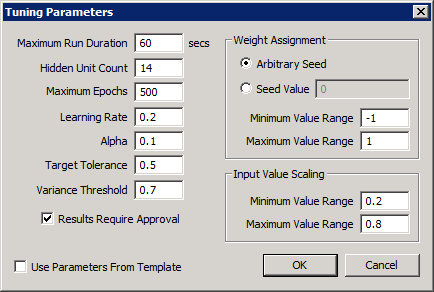
The properties on the Tuning Parameters dialog box are described below.
| Parameter | Description |
|---|---|
|
Maximum Run Duration |
Specify the maximum amount of time that the training session is allowed to take. |
|
Hidden Unit Count |
This value affects the internal structure of the neural network itself. A greater number of hidden units will reduce the number of required epochs to reach the target tolerance for training. However, at some point, configuring too many hidden units ceases to reduce the number of required epochs and simply adds to the processing time required to complete the training. The risk of specifying too few hidden units is that the training may never converge to the target tolerance in a reasonable number of epochs or time. Specify the number of hidden units used in the neural network algorithm. Values between 7 and 30 are typical. |
|
Maximum Epochs |
The maximum number of training iterations allowed in the training session. One epoch is all hours for all inputs. If the Target Tolerance was not achieved for a particular training cycle, consider raising the target tolerance or increasing the number of maximum epochs. |
|
Learning Rate |
This decimal value (between 0.0 and 1.0 exclusive) is used during the back-propagation step of the training algorithm to determine what fraction of the calculated error from each training pattern is applied as a correction to the weights of neural network being trained. A value close to 1.0 has the potential of converging to the target tolerance more quickly but also may result in an over-correction that causes the training process to fail to converge. Values between 0.1 and 0.2 are typical for yielding a successful training with a reasonable number of epochs. |
|
Alpha |
Also called the “momentum parameter,” this decimal value is used during the back-propagation step of the training algorithm to help minimize the negative impact of outlying training input data. The value should be between 0.0 and 1.0 exclusive. Using an Alpha value close to 1.0 allows the neural network to make reasonably large weight adjustments as long as the corrections are in the same general direction for several patterns, while using a small learning rate to prevent a large response to the error from any one training pattern. |
|
Target Tolerance |
Specifies the accuracy threshold required to determine that the training process was successful. |
|
Variance Threshold |
The minimum calculated variance threshold that triggers the retraining of a neural network definition. The default value for Variance Threshold is configured on the System Settings page. |
|
Weight Assignment |
Prior to training a neural network, the internal weights of the neural network must be initialized to random values. The weight assignment values allow some control over how the internal weights are assigned so that optimal settings may be determined and saved. |
|
Weight Assignment — Arbitrary Seed |
Selecting an arbitrary seed value for the weight assignment process will have the effect of initializing the weights differently every time the neural network is trained. This may be desirable when a specific seed value has yet to be determined. Comparing epoch counts and tolerances achieved from one training process to another may reveal a seed value that yields better results at which point, that value can be entered in the Seed Value field for continued use. |
|
Weight Assignment — Seed Value |
A specific seed value is set for use when initializing the internal weights of a neural network to provide more consistent performance of the training process as opposed to an arbitrary seed which may provide varied training results for the same training input data. |
|
Weight Assignment — Minimum Value Range |
Represents the minimum value used when generating the random values for initializing the neural network’s internal weights prior to training. |
|
Weight Assignment — Maximum Value Range |
Represents the minimum value used when generating the random values for initializing the neural network’s internal weights prior to training. |
|
Input Value Scaling |
The minimum and maximum numeric range into which all neural network input values will be scaled prior to training. |
|
Minimum Value Range |
Represents the minimum value used when scaling neural network input values prior to training. |
|
Maximum Value Range |
Represents the maximum value used when scaling neural network input values prior to training. |
|
Results Require Approval |
Click to specify if the results of a successful training process must first be reviewed and approved before the trained neural network definition can be used in the forecasting process. |
|
Use Parameters From Template |
For a neural network definition you can choose to use the configured tuning parameters from the neural network template. |


